What Is an AI API Gateway? How TokenByte Simplifies Multi-Model Integration
Davis
Building an AI application often means working with more than one model. You might use one model to generate code, another to summarize documents, and a third to create images or videos.
The challenge starts when each model comes from a different provider. You may need separate API credentials, different request formats, and provider-specific error handling. As your application grows, maintaining these integrations can take time away from the actual product.
An AI API gateway helps simplify this setup by providing a common access layer for supported models.
In this guide, we'll explain how an AI API gateway works, where it fits into a multi-model workflow, and how TokenByte can help developers manage integrations with less duplicated code.
Why Use an AI API Gateway?
Imagine you're building an AI-powered content production tool. It uses a language model to draft scripts, an image model to create visual assets, and a video model to turn those assets into moving scenes.
Each model serves a different purpose, but your application still needs to connect to each provider and handle its API requirements.
Without a shared integration layer, the application might need separate authentication logic, request handlers, response parsers, and error-handling routines for every provider. Switching models can also require changes to the application code.
These issues become more noticeable as you add models or expand into new use cases.
An AI API gateway can reduce this complexity by providing a centralized way to access supported models. Instead of maintaining every provider integration independently, developers can use a common entry point where compatible interfaces are available.
The goal isn't to make every AI model identical. It's to reduce the repetitive work involved in connecting to and managing them.
What Is TokenByte?
TokenByte is a multi-model API aggregation platform.
Rather than building an entirely separate integration for every AI provider, developers can use TokenByte as an intermediary between their applications and the models they need.
Without an API gateway:
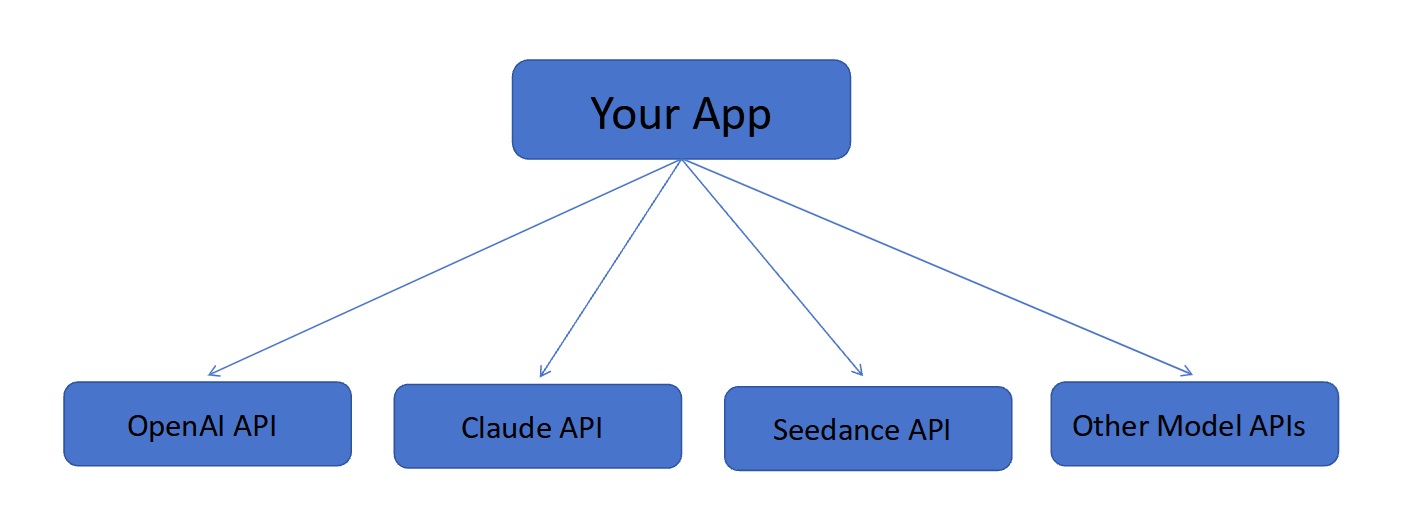
With TokenByte:
Your application uses TokenByte as a common access point for supported models. Where the API interfaces are compatible, this can reduce duplicated integration code and simplify model switching.

TokenByte's role is to simplify model access where its supported integrations allow it, rather than eliminate every provider-specific difference.
What Can Developers Do with TokenByte?
a. Google Review Automation
Use TokenByte to integrate AI models that automate Google review responses, helping businesses manage customer feedback more efficiently.
b. AI Microdrama Production
Use TokenByte to connect multiple AI models for scriptwriting, character design, and scene generation to streamline microdrama production.
c. Software Development
Use TokenByte to access multiple AI models through a unified API, simplifying integration and supporting coding, debugging, and application development.
Quick Start: Making an API Request with Python
Step 1: Create an API Key
Sign in / Sign up to TokenByte and create an API key through the available account console.

Step 2: Code Example
import requests
import json
import logging
import time
from typing import Optional, Dict, Any


logging.basicConfig(level=logging.INFO, format='%(asctime)s - %(levelname)s - %(message)s')
logger = logging.getLogger(__name__)

class TokenByteClient:
    """TokenByte API Client,Includes errors and retries"""

    def __init__(self, api_key: str, base_url: str = "https://api.tokenbyte.ai/v1"):
        self.api_key = api_key
        self.base_url = base_url
        self.max_retries = 3
        self.retry_delay = 1

    def chat_completion(self,
                       model: str,
                       messages: list,
                       temperature: float = 0.7,
                       max_tokens: int = 1000) -> Optional[Dict[str, Any]]:

        url = f"{self.base_url}/chat/completions"
        headers = {
            "Authorization": f"Bearer {self.api_key}",
            "Content-Type": "application/json"
        }

        data = {
            "model": model,
            "messages": messages,
            "temperature": temperature,
            "max_tokens": max_tokens
        }

        for attempt in range(self.max_retries):
            try:
                logger.info(f"Retry {attempt + 1} ,Model: {model}")

                response = requests.post(url, headers=headers, json=data, timeout=30)
                response.raise_for_status()

                result = response.json()

                if "error" in result:
                    error_msg = result.get("error", {}).get("message", "Unknown error")
                    error_code = result.get("error", {}).get("code", "unknown")
                    logger.error(f"API error: {error_msg} (code: {error_code})")
                    self._handle_api_error(error_code, error_msg)
                    return None


                logger.info(f"Success,Model: {model}, Response time: {response.elapsed.total_seconds():.2f} sec")
                return result

            except requests.exceptions.Timeout:
                logger.warning(f"Request timed out (attempt {attempt + 1}/{self.max_retries})")
                if attempt < self.max_retries - 1:
                    time.sleep(self.retry_delay * (attempt + 1))
                else:
                    logger.error("Maximum number of retries reached; request failed.")
                    return None

            except requests.exceptions.ConnectionError as e:
                logger.error(f"Network error: {e}")
                if attempt < self.max_retries - 1:
                    time.sleep(self.retry_delay * (attempt + 1))
                else:
                    logger.error("Reconnection failed")
                    return None

            except requests.exceptions.HTTPError as e:
                status_code = e.response.status_code if e.response else "unknown"
                logger.error(f"HTTP Error (Status code {status_code}): {e}")

                if status_code == 401:
                    logger.error("The API key is invalid or expired")
                    return None
                elif status_code == 429:
                    logger.warning("Request frequency exceeded; please back off and retry.")
                    if attempt < self.max_retries - 1:
                        time.sleep(5)
                    else:
                        logger.error("Request frequency exceeded")
                        return None
                elif status_code >= 500:
                    logger.warning(f"Server error ({status_code}),retry")
                    if attempt < self.max_retries - 1:
                        time.sleep(self.retry_delay * (attempt + 1))
                    else:
                        logger.error("Repeated Server Errors")
                        return None
                else:
                    logger.error(f"Non-Retryable HTTP Errors: {status_code}")
                    return None

            except json.JSONDecodeError as e:
                logger.error(f"JSON Response Parsing Failed: {e}")
                return None

            except Exception as e:
                logger.error(f"Unknow error: {e}", exc_info=True)
                if attempt < self.max_retries - 1:
                    time.sleep(self.retry_delay * (attempt + 1))
                else:
                    return None

        return None

    def _handle_api_error(self, error_code: str, error_message: str):
        """API Error Code"""
        error_handlers = {
            "invalid_api_key": "Invalid API key. Please check and update your API key.",
			"insufficient_quota": "Insufficient quota. Please add credits or check your usage.",
			"model_not_found": "The requested model does not exist or you are not authorized to access it.",
			"rate_limit_exceeded": "Rate limit exceeded. Please try again later.",
			"context_length_exceeded": "Context length exceeded. Please reduce the input length.",
        }

        handler = error_handlers.get(error_code)
        if handler:
            logger.error(f"API Error Handling: {handler}")
        else:
            logger.error(f"Unknown API Error Code: {error_code}, Info: {error_message}")


if __name__ == "__main__":

    API_KEY = "YOUR_TOKENBYTE_API_KEY"

    client = TokenByteClient(api_key=API_KEY)


    messages = [
        {"role": "user", "content": "TokenByte"}
    ]

    result = client.chat_completion(
        model="gpt-4",
        messages=messages,
        temperature=0.7,
        max_tokens=1000
    )

    if result:
        content = result.get("choices", [{}])[0].get("message", {}).get("content", "")
        print("API Request Successful!")
        print(f"Response: {content[:200]}...")
        print(f"Total Token Usage: {result.get('usage', {}).get('total_tokens', 'N/A')}")
    else:
        print("API request failed. Please check the logs and network connection.")
( For model-specific API examples, please refer to the documentation. )
If it fails, check the following:
Error or symptom What to check
| Code | Description & Action |
|---|---|
| 401 | Unauthorized Verify the API key and authentication header. |
| 403 | Forbidden Check account permissions, model access, and applicable restrictions. |
| 404 | Not Found Verify the API base URL, endpoint path, and model identifier. |
| 429 | Too Many Requests Check rate limits and retry according to the provider's guidance. |
Request timeout Check network connectivity, timeout settings, and whether the model requires asynchronous processing.
These are general API troubleshooting steps. The exact error codes and their meanings depend on the endpoint implementation.
Is an AI API Gateway Right for Your Project?
A multi-model API gateway is worth considering if your application uses several AI providers, you frequently test alternative models, or maintaining separate integrations is becoming time-consuming.
It may be less useful for a small application that relies on a single model and has no plans to expand.
Before choosing a platform, check a few practical details:
•Model availability: Does it support the specific models and capabilities your application needs?
•API compatibility: Which endpoints and request formats are supported?
•Usage visibility: What request logs, usage statistics, and pricing information can you access?
•Reliability: What are the platform's rate limits, timeout behavior, and failure-handling options?
•Data handling: How are API requests processed, retained, and handled by the gateway and underlying providers?
These details matter more than the number of models listed on a platform. The right solution is one that supports your actual workload and reduces complexity without introducing unacceptable trade-offs.
Finally
Integrating multiple AI models gives developers more options, but managing separate provider APIs can become a maintenance burden as applications grow.
TokenByte offers a centralized access layer for supported models, helping developers simplify compatible integrations and work with multiple AI capabilities through a common platform.
If you're building an AI application, start by identifying which tasks need different models, then test the relevant integrations against your requirements for quality, latency, cost, and reliability.
The aim isn't to use as many models as possible. It's to choose the right ones for the job without making the underlying application harder to maintain.